


Extracting data from financial statements manually is error-prone and time-consuming. Artificial intelligence extracts data cleanly and quickly. And it can be done for free. If you're still doing this task manually in 2026, you're wasting your time.
We tested the free tiers of leading AI systems by uploading balance sheets from three example documents. The general-purpose AI systems we chose were Gemini from Google, and ChatGPT from OpenAI and Claude from Anthropic. Of course, we also compared the results from Evolution AI's own solution, called Financial Statements AI.
We downloaded three financial statements from pappers.fr, an open database of financial statements for French companies and tested them across all four systems. We assumed French private companies were less likely to be in the LLM training data, and would lead to a fairer test.
Our first test document was the 2023 annual accounts for a private limited company called International Investissement. The balance sheet spans pages 3 and 4.
ChatGPT failed immediately. It appears, at least in the free tier, unable to extract from a scanned image pdf (this pdf doesn't contain a text layer).

Gemini produced a usable spreadsheet, but with notable errors (excel file):

The free version of Claude didn't allow pdf upload so we couldn't test the performance.
Financial Statements AI produced good results (excel file). Row 10 had a similar column alignment issue with the 299 value to Gemini. That was the only error.
The critical difference: FSAI preserved every line item, including those without explicit values.
Our second test document is the 2016 annual accounts for the same company, International Investissement. The document contains a balance sheet on pages 3-4.
ChatGPT again identified the document as image-based and could not extract structured data. After multiple iterations of prompting, ChatGPT claimed it had created an Excel file. Each download link failed. After several more rounds of assurances (along the lines of "You're definitely going to be able to download from this link, guaranteed!"), we gave up.
ChatGPT's free tier appeared unable to process scanned financial documents into structured spreadsheets at the time of testing.
Gemini extracted data from both the balance sheet, but again missed many line items (excel file). Rows without explicit numerical values were omitted, a recurring problem from Document 1.
Again, the free version of claude did not allow the pdf to be uploaded.
Financial Statements AI delivered comprehensive results (excel file). There was one error: one number appeared in the wrong column.
Crucially, Evolution AI's solution preserved the structural integrity of both statements. Section headers, CERFA codes, and the hierarchical organization remained intact. The output included both an extracted sheet (faithful to the original document) and a structured data sheet (mapped to a consistent format for automated processing).
Our third test document is the 2019 annual accounts for a private limited company called INOV.
Partial success! ChatGPT finally was able to extract some data from this document (excel file). However, visually the output looks scattered. The headers and structure are completely disorganised. The left-side vertical group names have been scrambled. Multiple spaces have been inserted into each word of the addresses.
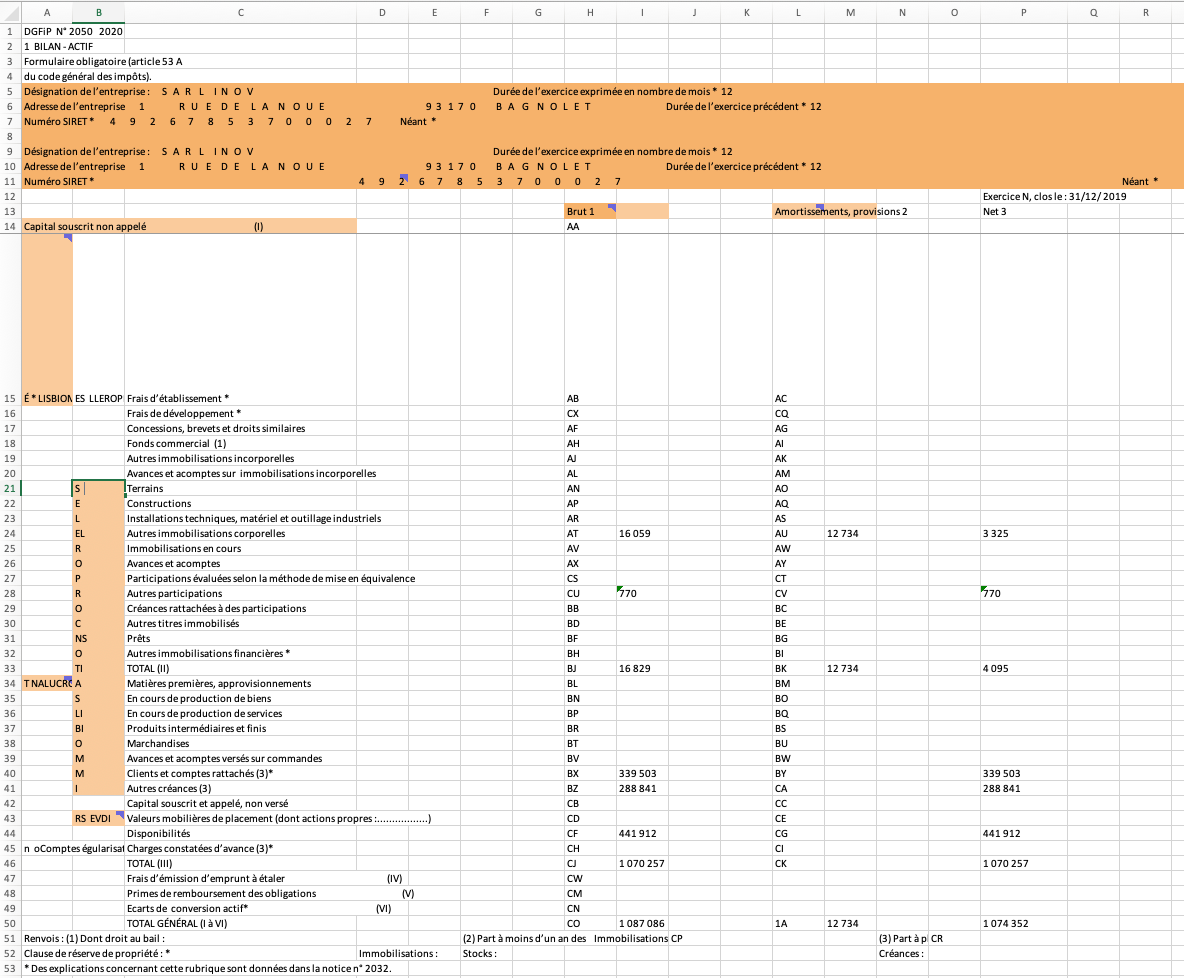
Quite a bit better than ChatGPT. Gemini was able to extract the data from the document (excel file), although quite alot of back and forth was required to refine the prompt. Additionally, the output is still not perfect. Several rows were missing or partially extracted.
As expected, the free version of claude did not allow the pdf to be uploaded.
Financial Statements AI performed well (excel file). Importantly, there was no need to iteratively improve a prompt, it just did what I wanted from the beginning. All numbers are correct. Some titles of rows are incompletely extracted.
Our tests revealed three consistent failure modes.
1. Scanned document handling
ChatGPT's free tier cannot process image-based PDFs at all. Many official financial filings, particularly those from company registries, arrive as scanned documents. A tool that cannot handle scanned PDFs fails on a significant portion of real-world financial documents.
2. Understanding of financial statements convention
Financial statements use blank cells to represent zero. General-purpose AI sometimes interpret blank cells as "nothing to extract" rather than "zero." Entire line items vanish from the output. An analyst reviewing the result has no way to distinguish a genuinely missing item from one the tool silently dropped.
3. Table structure preservation
Financial statements contain complex nested structures: sections, subsections, totals, and subtotals. French tax filings add vertical section labels and CERFA line codes. General-purpose AI tools tend to flatten these structures, reverse row order, or scramble vertical text. Reconciling the output against the source document becomes difficult and time-consuming.
For occasional, low-stakes extraction, Gemini's free tier produces reasonable results. Expect to spend time manually verifying and correcting errors, particularly missing rows and column misalignments.
For professional use where accuracy and completeness matter, a specialized tool like Financial Statements AI offers clear advantages:
Financial Statements AI offers a free tier for extracting data from balance sheets and income statements. Upload a document and compare the results against Gemini, Claude, and ChatGPT.
Author: Martin Goodson is a former Oxford University scientific researcher and has led AI research at several organisations. He is a member of the advisory group for the University College London generative AI Hub. In 2019, he was elected Chair of the Data Science and AI Section of the Royal Statistical Society, the membership group representing professional data scientists in the UK. Martin is the CEO of the multiple award-winning data extraction firm Evolution AI. He also leads the London Machine Learning Meetup, the largest AI & machine learning community in Europe.


